Easy Apply is convenient, and that is the problem: because it takes seconds, a popular posting can collect a large number of applications very quickly. To get noticed, you need to be early, relevant and consistent. These tips are about doing the small things that most applicants skip.
Before you apply
1. Search by recency
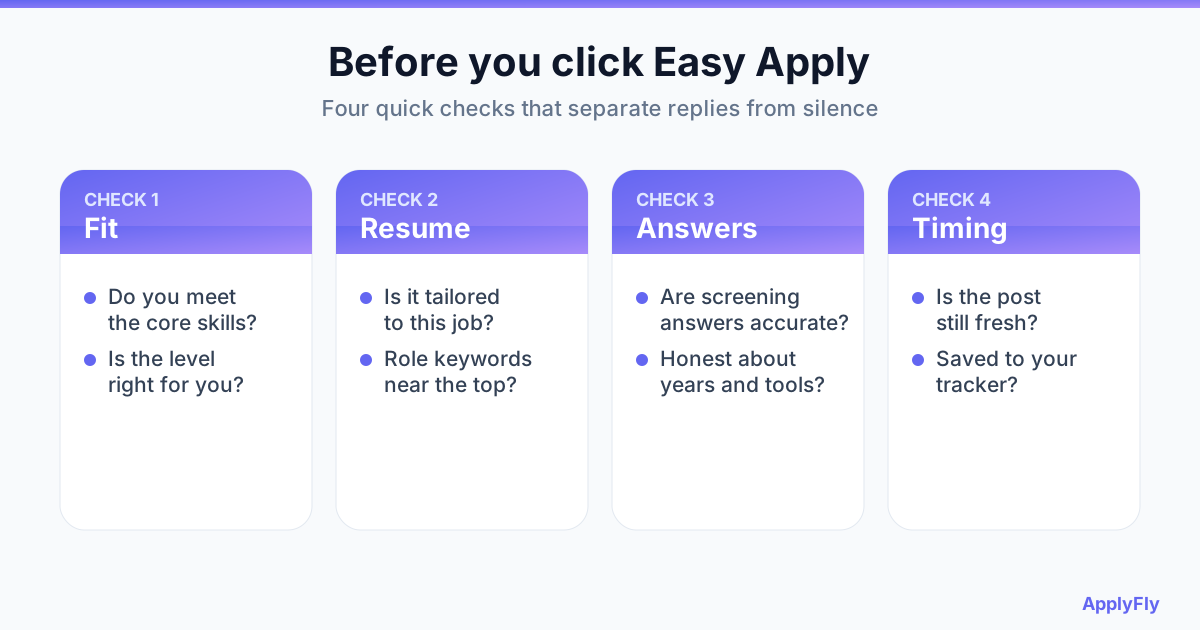
Use the date-posted filter to see the newest roles first. Early applicants are more likely to be reviewed, so set up job alerts for your target titles and act on them quickly.
2. Filter, then read the whole description
Use the Easy Apply, experience level and location filters to narrow things down, then actually read the description. If you do not meet most of the core requirements, move on and save your effort for a better match.
3. Make your profile match your resume
Recruiters often look at your profile after seeing your application. Your headline, current role and skills should agree with the resume you sent. Mismatches look careless.
While you apply
4. Upload a tailored resume, not the default one
Easy Apply often pre-selects a resume you used before, which makes it tempting to click through. For roles you care about, upload a version that uses the job's keywords and puts the relevant experience first. See our guide to beating the ATS.
5. Answer every screening question honestly
Years of experience and tool questions are often used to filter candidates, and your answers will be compared with your resume. Be accurate. An inflated answer can pass a filter but fail the interview.
6. Keep your contact details current
Check your email and phone before every batch. A missed call from a recruiter because of an old number is a silly way to lose a role.
7. Add a short note when the form allows it
When there is a text field for a message or cover letter, two or three specific sentences about why you fit this role beat a generic paragraph. Keep it short.
After you apply
8. Message a human for your best picks
Find the recruiter or hiring manager on the posting, and send a brief, polite note saying you applied and one reason you fit. Do this only for roles you truly want.
9. Track every application
Keep the company, role, date and which resume version you used. Without a record you will not know what is working.
10. Do not rely on Easy Apply alone
For a dream company, also apply through its careers page and reach out to someone there. Many employers use platforms like Greenhouse, Lever and Workday for their own listings, and applying there can reach the hiring team directly.
11. Keep a steady routine
A focused daily batch beats a weekend binge. If the tailoring and form filling is what slows you down, [ApplyFly](/features) can tailor your resume per job, score it with an ATS check, and apply on LinkedIn and ATS platforms for you, so you can spend your time on follow-up. Read how many jobs to apply to per day to set the right pace.
Spend less time clicking, more time interviewing
Let ApplyFly tailor and submit applications while you focus on the conversations that matter.
Try ApplyFly FreeFree trial · No credit card required
Frequently asked questions
Does Easy Apply hurt my chances compared with the company website?
Not inherently. The difference is volume: Easy Apply is quick, so postings attract many applicants. Standing out through timing, tailoring and a follow-up message matters more than the channel.
Why am I not getting replies from Easy Apply jobs?
Common reasons are applying late, applying to roles that are a weak match, a resume that does not use the job's keywords, and screening answers that filter you out. Fix those before applying to more roles.
Should I message the recruiter every time?
No. Do it for roles you really want. A short, specific message to a person for your top picks is more effective than messaging for every application.
Can I automate Easy Apply?
Yes, with tools that fill and submit applications for you. Look for ones that tailor your resume per job and have a fit check, so automation raises your volume without lowering your quality.